 Pace
Pace


F1 25 league tools: broadcast, team radio and steward — from one PC in the lobby.
One person with Pacedex in the lobby — a spectator is fine — and your F1 24/25 league round gets an F1 TV–style broadcast in OBS with a commentary booth, team radio for a friend on the pit wall, and a steward with both drivers' telemetry in every contact. Free, no account. Drivers install nothing to show up on screen.
The league kit
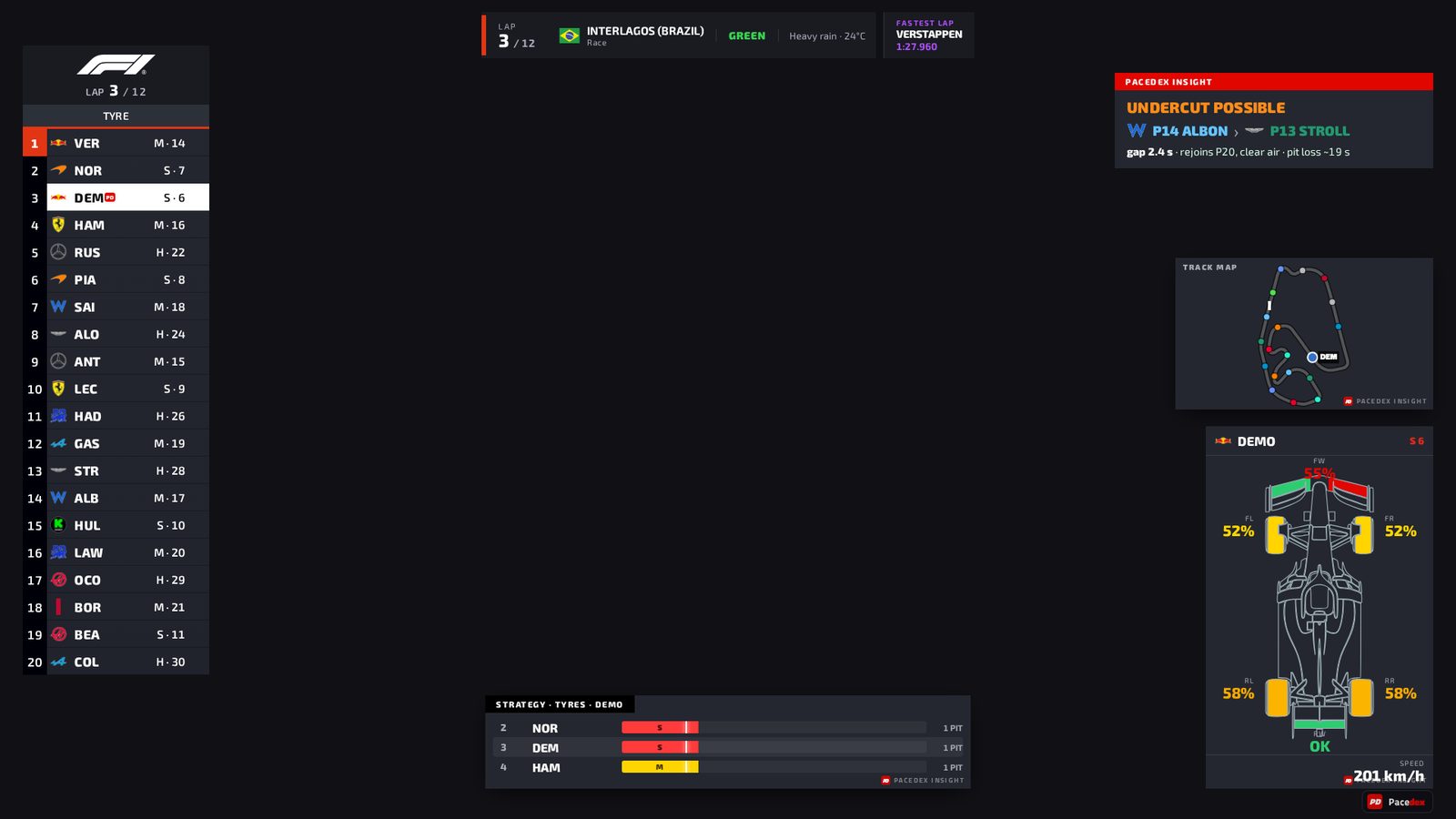
Broadcast + Commentary Booth
An F1 TV–style overlay for OBS, and the commentator's screen that puts any of it on air by click or key.
- One browser source — 127.0.0.1:8086/broadcast, 1920 × 1080 stage. No SimHub, no plugin.
- Animated tower of all 22 cars, event cards, battle, pit stops, strategy, weather, crew and league card.
- Booth on the same PC (spectator in the lobby) or remote at pacedex.com/booth, with /live/<code> in the OBS.
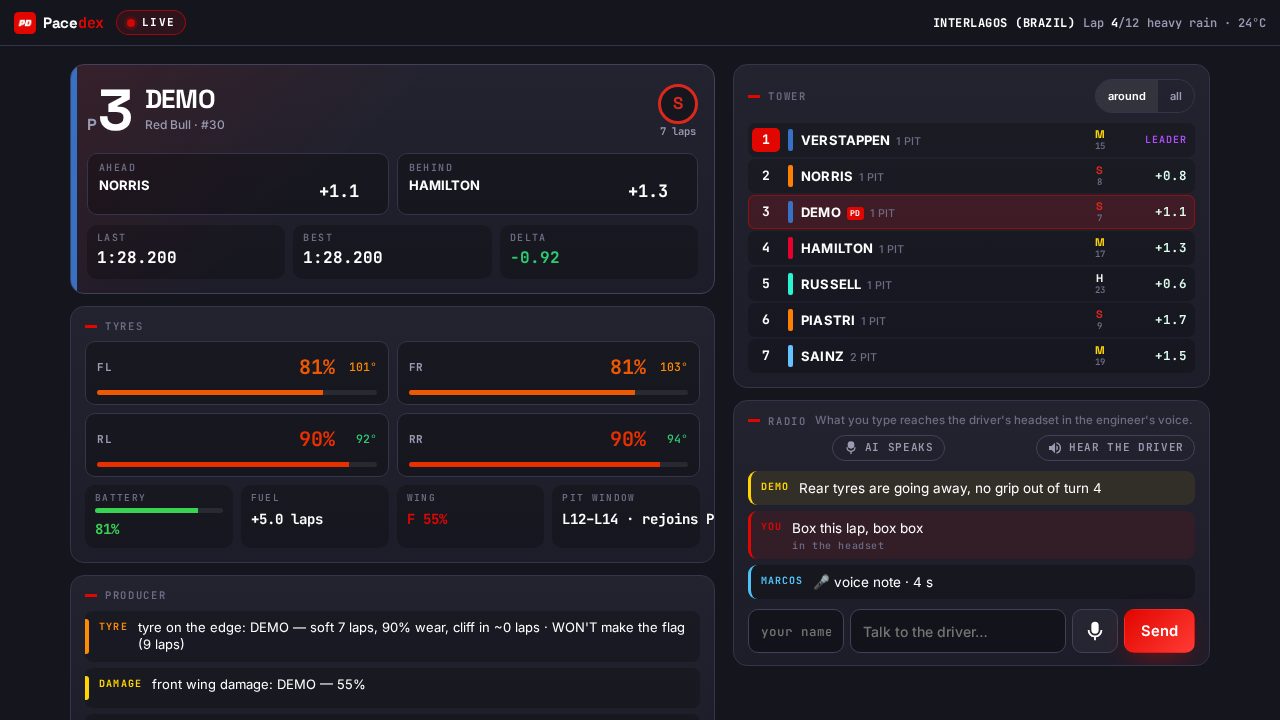
Pit Wall · team radio
A friend sees your car live on their phone and talks on your radio, into your headset.
- Link, QR code or WhatsApp with an 8-letter code — any browser, nothing to install, no VPN, no lobby slot.
- Gaps and their trend, four tyres, battery, fuel, wings, pit window, the tower and the rain forecast.
- Text arrives in your engineer's voice; voice notes both ways; a second push-to-talk lets you talk back.
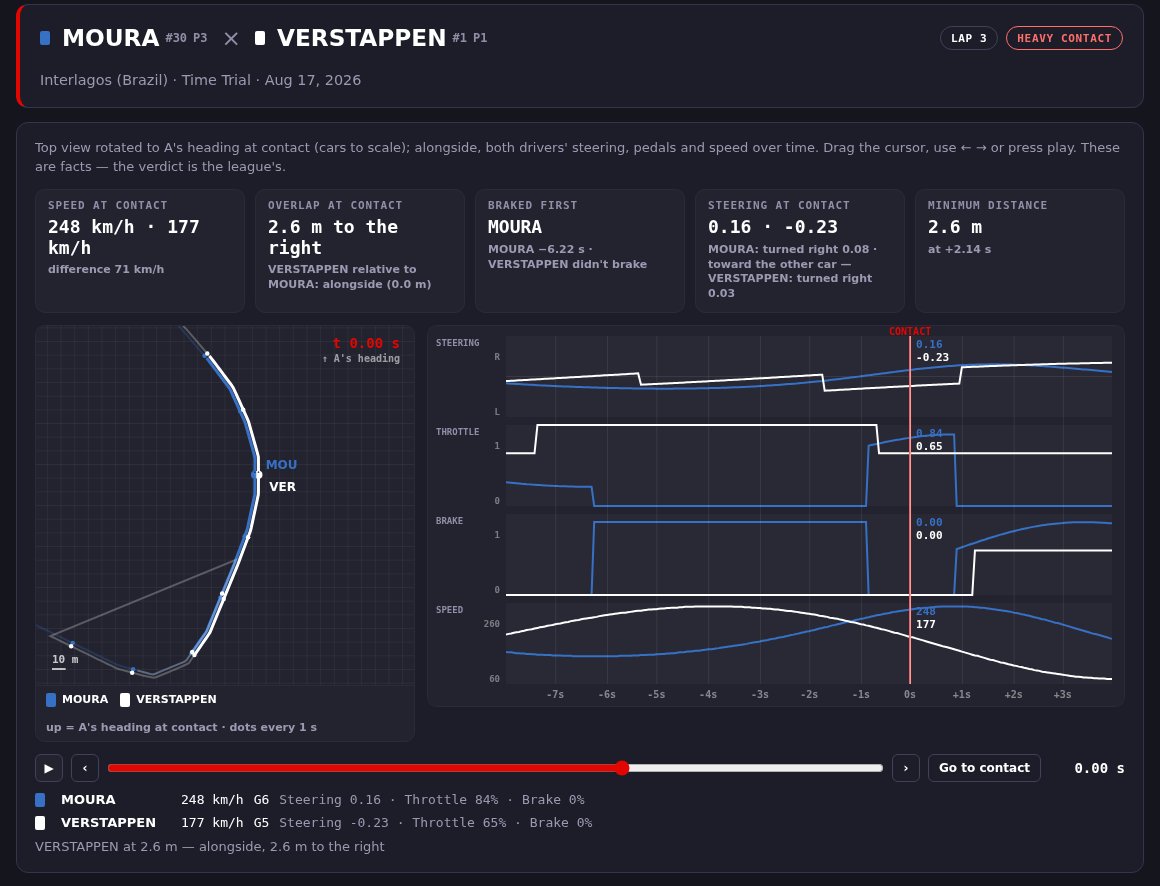
Steward mode
Every contact between two cars becomes an incident with both drivers' telemetry — facts, the verdict stays with the league.
- 12 s of steering, throttle, brake, speed and position of both cars, with a top-down view to scale.
- Saved on its own for every collision the game reports; a button or hotkey marks anything else by hand.
- “Share link” publishes the incident at pacedex.com/i/<id> with a picture for the group chat — revocable.
How a round works, role by role
The organizer, or the commentator in the lobby
Joins the lobby as a spectator with the game open and Pacedex on. OBS gets 127.0.0.1:8086/broadcast; the Booth tab (Live → Booth) directs that overlay from this PC — no code, no internet needed. Every camera cut in the game puts that car's card on air.
The commentator, from another city
No game needed: opens pacedex.com/booth with the room code and puts pacedex.com/live/<code> in their own OBS. Needs at least one Pacedex in the lobby sending its telemetry to the room; runs about half a second behind the game.
The drivers
Position, gaps, sectors, pits and penalties are always public. Drivers who do run Pacedex join the session's room by themselves (on by default), give everyone's tower their car's deep telemetry with the PD badge — and can open their pit wall for a friend on the radio.
The steward
One person in the lobby — the same spectator, or any driver. Every collision the game reports is saved with both cars' telemetry; “Share link” gives the league pacedex.com/i/<id>. On a driver set to Restricted the game sends zeros for steering and pedals — the page flags it.
Frequently asked
Does every driver need to install Pacedex?
No. The game sends the telemetry of all 22 cars to whoever is listening in the lobby, so one PC running Pacedex — a spectator is fine — is enough for the broadcast overlay, the commentary booth and the steward mode. Drivers who also run it enrich everyone's tower with their car's deep telemetry and get the PD badge, automatically. For the pit wall it is the driver who runs Pacedex; the friend on the wall only opens a link.
Does it work with F1 24 and the F1 25 2026 Season Pack?
Yes: F1 24, F1 25 and F1 25: 2026 Season Pack, on PC, through the game's official UDP telemetry.
Is it free? Can I use it in my league's public stream?
Pacedex is free and needs no account; the overlay is yours to stream on Twitch or YouTube. Pacedex is an independent project, not affiliated with Formula 1, the FIA or Electronic Arts — the F1 TV–style skin is a visual language, not official graphics.
Does it work alongside SimHub, Stop and Go or RaceLab?
Pacedex is a standalone app: the overlay is one OBS browser source, with no SimHub, plugin or skin needed. Only one program can listen on a UDP port at a time, so to run it next to SimHub (with Stop and Go) or RaceLab, enable UDP forwarding in that app to a second port — 20888, for example — and change the port in Pacedex's Settings tab.
What leaves my PC, and what is stored?
Nothing leaves your PC until you open the pit wall or join a room — the automatic league room (on by default, off in Settings) does that join for you when two or more humans share the lobby. What goes out is the same live state the tower and the dash show, the tower of the 22 and the cues — never your history or database. The relay keeps no database and no log: the room lives in memory and disappears when the session ends. Sharing an incident is one click per incident, and the link can be revoked. The local booth uses no internet at all. Details in the privacy page.
Bring the whole kit to your next round
Free · Windows · no account. Broadcast overlay, Commentary Booth, Pit Wall, steward mode, voice race engineer and corner-by-corner analysis for F1 24/25/26.
Download free · Windows →